Used Robot Vacuum Checklist for Pet Homes: How to Inspect Battery, Brushes, Filters & Odor Before You Buy
Introduction
Pet owners often rely on robot vacuums to maintain a clean floor, yet purchasing a used unit can be risky without proper inspection. This guide explains how to evaluate battery health, brush condition, filter efficiency, and lingering odors before committing to a purchase. Readers will learn actionable steps, recommended tools, and common pitfalls to avoid. By following the checklist, one can protect their investment and ensure a hygienic environment for both pets and people.
What You'll Need
- Battery voltage tester or multimeter
- Replacement brush kits such as the Roomba 600/500 Replacement Kit
- Filter replacement sets like the iRobot Roomba Replenishment Kit
- Cleaning tools (screwdriver, soft cloth) included in the kits
- Smartphone with the robot’s companion app (if applicable)
Step 1: Verify Battery Health
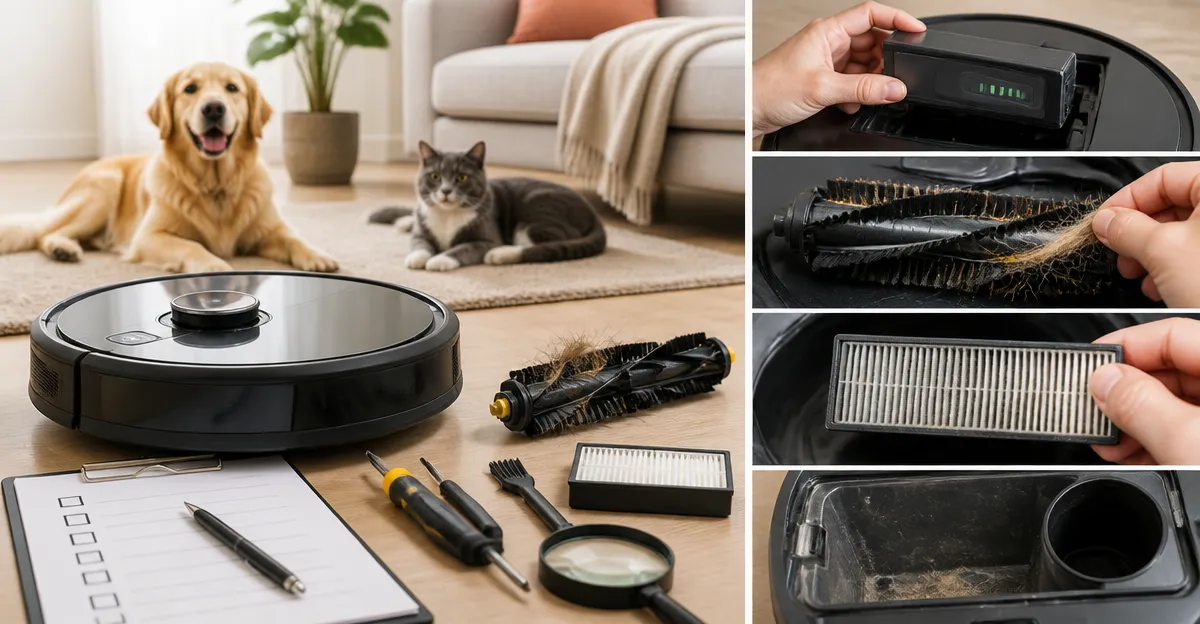
The battery powers the robot for 60 to 120 minutes, depending on the model, and its capacity degrades over time. Begin by locating the battery compartment, often secured with a few screws; the Roomba 600/500 Replacement Kit includes a screwdriver and screws to safely open older Roomba units. Use a multimeter to measure the voltage; a healthy 14.4 V Li‑ion battery should read within 12.5 V to 14.4 V under no load. If the voltage is significantly lower, consider the cost of a new battery versus purchasing a refurbished robot such as the Shark UR2360S Robot Vacuum, which offers a warranty and a fresh battery.
Step 2: Inspect Main and Side Brushes
Brushes collect hair, fur, and debris; worn bristles reduce cleaning efficiency and may damage flooring. Remove the side brushes using the provided screwdriver; the Roomba 600/500 Replacement Kit supplies two bristle and flexible beater brushes plus six side brushes, allowing direct comparison with the existing parts. Examine each brush for fraying, curling, or missing bristles; a brush that appears bent can be softened by soaking in warm water, as recommended in the kit’s instructions. For newer Roomba e/i/j models, the Roomba e/i/j Replacement Parts Kit provides high‑quality soft‑nylon side brushes and a dual‑multi‑surface rubber brush that stays in contact with carpets and hard floors, ensuring consistent suction.
Step 3: Evaluate Filter Condition
Filters capture fine dust and pet dander; a clogged filter diminishes suction and may emit unpleasant odors. Open the dustbin and locate the HEPA‑style filter; the iRobot Roomba Replenishment Kit contains three high‑efficiency filters that trap 99 % of allergens, a crucial feature for households with cats or dogs. Compare the existing filter’s appearance to the new ones; discoloration, tears, or a strong musty smell indicate replacement is necessary. The kit’s filters are priced at $60.99 and hold a 4.6‑star rating from 3,580 reviewers, reflecting reliable performance. If the robot uses a different filter size, verify compatibility before purchase.
Step 4: Detect Odor and Internal Contamination
Odor often signals mold, mildew, or trapped pet hair inside the robot’s chassis. Perform a sniff test near the intake vents and the dustbin; a sour or stale smell suggests internal moisture buildup. Use the cleaning brush included in the Roomba e/i/j Replacement Parts Kit to dislodge hair from hidden crevices. After cleaning, run the robot for a short cycle and observe whether the odor persists; lingering smells may require a deeper disassembly, which could be cost‑prohibitive for older models. In such cases, consider a newer model like the Shark AV2501S AI Ultra Robot Vacuum, which features a self‑cleaning brushroll and HEPA filtration that minimize odor buildup.
Step 5: Verify Software and Mapping Accuracy
Modern robots rely on LiDAR or visual mapping to navigate efficiently; a used unit should retain accurate maps. Connect the robot to its companion app and initiate a mapping run; observe whether the map aligns with room dimensions and whether the robot avoids obstacles. The Shark AV2501S utilizes 360° LiDAR vision for precise home mapping, while the Shark UR2360S employs Matrix Clean technology that takes multiple passes for thorough coverage. If the used robot fails to map correctly, it may indicate sensor wear or firmware issues that are difficult to repair.
Tips & Pro Tips
- Replace brushes and filters every 2‑4 months for optimal performance, as suggested by the Roomba 600/500 Replacement Kit instructions.
- When testing battery voltage, perform the measurement after the robot has rested for at least 30 minutes to obtain a stable reading.
- Warm water can restore bent side brushes; ensure they are completely dry before reinstallation.
- Use the provided installation tool from the Roomba e/i/j Replacement Parts Kit to avoid stripping screws.
- Document serial numbers and compare them with the manufacturer’s warranty database to verify authenticity.
Troubleshooting
Battery drains quickly: Re‑calibrate the battery by fully charging, then allowing it to discharge to the low‑battery warning before charging again. If the issue persists, the battery may need replacement.
Brushes do not spin: Check for tangled hair around the brush motor shaft; use the cleaning brush from the replacement kit to clear debris. Inspect the motor connector for loose wires.
Robot emits a burning smell: Immediately power off the unit; a burning odor may indicate motor overheating or a short circuit, which requires professional service.
Conclusion
Inspecting a used robot vacuum involves systematic evaluation of battery health, brush integrity, filter efficiency, and odor presence. By employing the recommended replacement kits and following the step‑by‑step checklist, pet owners can make an informed purchase that delivers reliable cleaning without hidden costs. Remember to weigh the price of replacement parts against the benefits of a newer, warranty‑covered model, and choose the option that best fits your household’s needs.
Frequently Asked Questions
How can I test the battery health of a used robot vacuum?
Use a multimeter or battery voltage tester to measure the voltage and compare it to the manufacturer's specifications; a significantly lower reading indicates reduced capacity.
What signs show that the brushes need replacement?
Look for frayed bristles, missing teeth, or excessive wear that prevents effective pet hair pickup.
How do I evaluate the condition of the vacuum's filters?
Inspect filters for discoloration, clogs, or a strong odor; replace them if they appear dirty or restrict airflow.
What is the best way to detect lingering odors in a used robot vacuum?
Run the unit on a low‑suction setting in a well‑ventilated area and sniff the exhaust; any musty or burnt smell suggests internal contamination.
Which tools are essential for a thorough pre‑purchase inspection?
A screwdriver, soft cloth, multimeter, and the robot’s companion app (if available) are needed to access components, clean parts, and check firmware status.