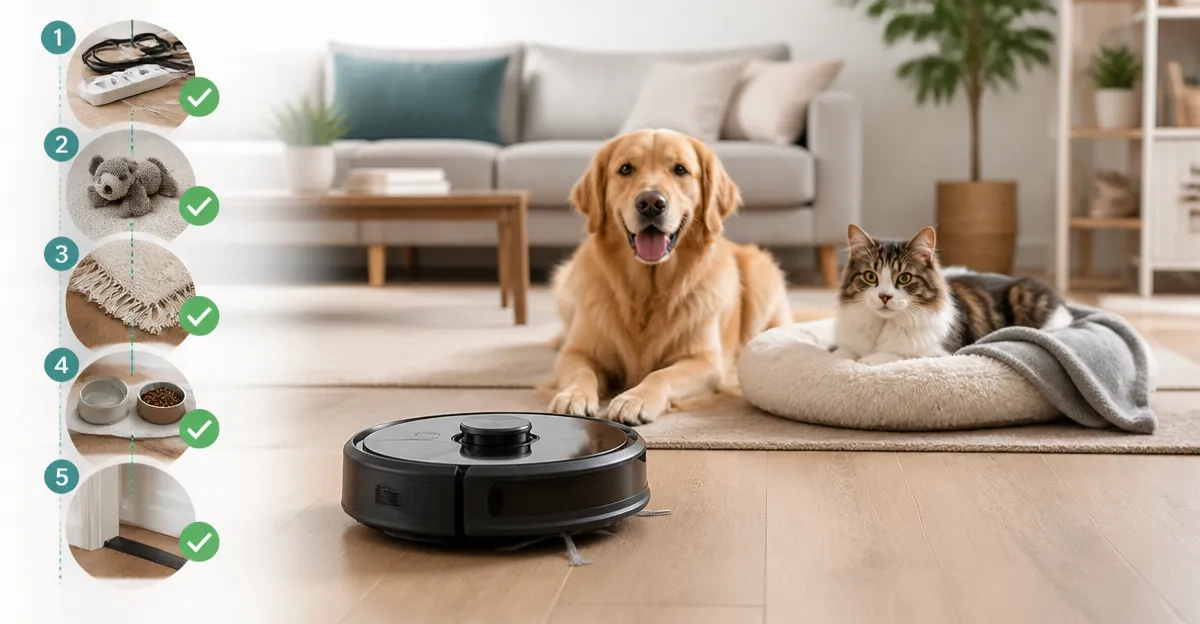
How to Perform a Pet‑Safe Home Audit Before Your Robot Vacuum’s First Run: Step‑by‑Step Checklist to Prevent Pet Hazards
Introduction
This guide will teach readers how to conduct a thorough, pet‑safe audit of their living space before activating a robot vacuum for the first time. By following the checklist, pet owners will reduce the risk of the robot becoming stuck, damaging furniture, or exposing pets to hidden debris. The process also improves mapping accuracy, extends battery life, and maximizes the value of high‑performance models such as the MAMNV Robot Vacuum and the Tikom G8000 Max.
Pet owners often underestimate how small objects, loose cords, or unsecured pet zones can interfere with autonomous navigation. The audit described here combines practical housekeeping with strategic use of robot‑vacuum accessories, ensuring a smooth launch and long‑term reliability.
Readers will finish this article with a printable checklist, a clear understanding of which tools to use, and confidence that their pets will remain safe while the robot performs its duties.
What You’ll Need
- Vacuum robot of choice (e.g., MAMNV Robot Vacuum, Tikom G8000 Max, ROPVACNIC Robot Vacuum, or Shark AV2501AE Robot Vacuum)
- Selgo 10" Vacuum Floor Brush (Selgo 10" Vacuum Floor Brush) – for cleaning tight spaces before mapping.
- Micro‑fiber cleaning pads (often supplied with robot mop kits).
- Low‑profile trash bins or storage containers for loose items.
- Measuring tape or ruler to verify clearance under furniture.
- Notebook or digital note‑taking app for recording measurements and no‑go zones.
Step‑by‑Step Instructions
1. Clear Floor Clutter and Identify High‑Traffic Areas
The first task is to remove toys, shoes, and stray pet accessories that could obstruct the robot’s path. A clean surface enables the LiDAR or visual navigation system to generate an accurate map.
Use the Selgo 10" Vacuum Floor Brush attached to a standard shop‑vac to quickly sweep under sofas and bed frames. The brush’s 10‑inch width and soft bristles allow non‑scratch cleaning on hardwood while reaching low‑profile spaces. Priced at $11.95 with a 4.5‑star rating from 1,265 reviews, it offers a cost‑effective way to clear debris that could otherwise confuse the robot’s sensors.
After sweeping, place any loose items in a nearby bin. Record the locations of permanent obstacles (e.g., decorative statues) for later reference when setting no‑go zones.
2. Secure Loose Cords, Cables, and Small Objects
Robot vacuums often snag on charging cords, curtain ties, or pet toys. Inspect each room and use cable organizers or zip ties to bundle cords along baseboards. For pets that like to chew, consider cord covers made of chew‑resistant material.
Pet hair can accumulate around cords, causing the anti‑tangle brush of the MAMNV Robot Vacuum to work harder. The MAMNV model features a 11500Pa suction system and an anti‑tangle brush roll that prevents hair from wrapping, which is especially useful in homes with multiple cats or dogs.
Document any areas where cords remain unavoidable; these will become candidate no‑go zones during mapping.
3. Measure Clearance Under Furniture and Adjust Height‑Sensitive Zones
Most robot vacuums have a maximum height clearance. The Tikom G8000 Max measures only 2.99 inches tall, allowing it to glide beneath most beds and sofas. The ROPVACNIC Robot Vacuum also features a low‑profile design.
Using a ruler, verify that the clearance under each piece of furniture exceeds the robot’s height. If not, raise the furniture with small risers or relocate the item. This step prevents the robot from becoming stuck, a common complaint in the reviews of both the MAMNV and Shark models.
4. Create Pet‑Safe Zones and No‑Go Areas
Pets may become anxious if a robot approaches their feeding stations or sleeping spots. Most modern robots support virtual walls or no‑go zones via their companion apps.
Open the app for your chosen robot and draw boundaries around pet bowls, litter boxes, and any area where a pet may hide. The MAMNV’s LiDAR navigation and smart mapping allow precise zone creation, while the Shark AV2501AE uses Matrix Clean Navigation with similar capabilities.
Save the map after each adjustment and test the virtual barrier by manually moving the robot toward the zone. If the robot respects the barrier, the pet‑safe zone is correctly configured.
5. Test the Self‑Empty Base and Dust‑Bag Capacity
If you own the MAMNV Robot Vacuum, place its 90‑day self‑emptying base in a discreet corner. The sealed dust bag holds up to three months of pet hair, reducing the frequency of manual emptying.
Run a short cleaning cycle and verify that the robot docks correctly, transfers debris to the bag, and resumes cleaning. The base’s large capacity is particularly valuable for households with multiple pets, as noted in several customer reviews.
For models without a self‑emptying base (e.g., the Tikom G8000 Max), schedule regular manual emptying of the 450 ml dustbin to avoid overflow.
6. Perform a Manual Navigation Run to Validate Mapping Accuracy
Before scheduling automated runs, initiate a manual cleaning session. Observe the robot’s path, paying attention to how it negotiates tight corners and transitions between floor types.
If the robot repeatedly misses a spot, adjust the placement of side brushes or ensure the water tank (for mop‑capable units) is properly seated. The Shark AV2501AE’s self‑cleaning brushroll and the ROPVACNIC’s dual rotating side brushes are designed to handle pet hair without entanglement.
Note any areas where the robot hesitates; these may require additional no‑go zones or a temporary removal of obstacles.
7. Configure Cleaning Schedules Aligned with Pet Activity
Set cleaning times when pets are least active. Most owners schedule runs during work hours or after a walk. This reduces the likelihood of a startled pet interfering with the robot.
Use the app to assign specific rooms to different days. For example, schedule high‑traffic living‑room cleaning on weekdays and bedroom cleaning on weekends when pets are more likely to be in those spaces.
Enable notifications so you receive alerts if the robot encounters an issue, such as a full dustbin or a blocked path, allowing prompt human intervention.
8. Final Verification and Documentation
After completing the above steps, run a full‑home cleaning cycle. Observe the robot for at least one complete pass, confirming that it respects all no‑go zones, empties into the base (if applicable), and returns to its dock without error.
Record the final map screenshot, note any remaining problem areas, and update your checklist accordingly. This documentation will be useful for future troubleshooting or when upgrading to a new robot model.
Tips & Pro Tips
- Place a thin piece of cardboard under low‑profile furniture to create a temporary ramp for the robot, especially useful for the Tikom G8000 Max’s 2.99‑inch height.
- Use the robot’s remote control (available on most models) to manually direct it to problematic spots for spot cleaning.
- Refresh the water tank with distilled water to prevent mineral buildup on mop pads, extending pad life.
- For homes with heavy shedding, consider adding an extra dust bag to the MAMNV self‑emptying base to avoid reaching the 90‑day limit prematurely.
- Regularly inspect the anti‑tangle brush roll on the MAMNV and the side brushes on the ROPVACNIC to ensure they remain free of clumped hair.
Troubleshooting
| Problem | Possible Cause | Solution |
|---|---|---|
| Robot stops mid‑cycle | Dustbin full or water tank empty | Empty dustbin, refill water tank, and resume cleaning. |
| Robot repeatedly bumps into a wall | Incorrect mapping or missing no‑go zone | Delete current map, re‑run mapping, and set accurate virtual walls. |
| Pet hair accumulates despite cleaning | Brush roll tangled or suction reduced | Remove brush roll, clear hair, and check filter for clogs. |
| Robot fails to dock | Charging station obstructed or floor uneven | Clear area around dock, ensure dock is on a flat surface, and verify that the robot’s charging contacts are clean. |
Conclusion
By following this pet‑safe home audit, owners can launch their robot vacuum with confidence, knowing that floors are clear, pet zones are respected, and the device operates within its design parameters. The checklist reduces the likelihood of interruptions, protects pets from accidental encounters, and maximizes the efficiency of premium models such as the MAMNV Robot Vacuum and the Tikom G8000 Max. Regular maintenance and periodic re‑mapping will keep the system performing at peak levels for years to come.
Products Mentioned in This Guide
Frequently Asked Questions
What is a pet‑safe home audit for a robot vacuum?
It’s a pre‑run checklist that identifies hazards like loose cords, small objects, and unsecured pet zones to keep both pets and the robot safe.
How can I prevent my robot vacuum from getting stuck by pet toys?
Collect or secure all toys and small items in a designated area before the first run, or use virtual barriers to block high‑traffic play zones.
Should I secure loose cords before the robot starts cleaning?
Yes, tie up or hide cords to avoid entanglement, which protects the robot’s wheels and prevents damage to pets.
How does a pet‑safe audit improve mapping accuracy and battery life?
Removing obstacles lets the robot navigate freely, creating more accurate maps and reducing unnecessary re‑tries that drain the battery.
Are there accessories that make robot vacuums more pet‑friendly?
Pet‑specific accessories like boundary strips, silicone bumpers, and detachable brushes help protect pets and keep the robot running smoothly.